
Creating a Custom GPT
Step-By-Step
Create, Review, Improve

Create and Customize GPTs
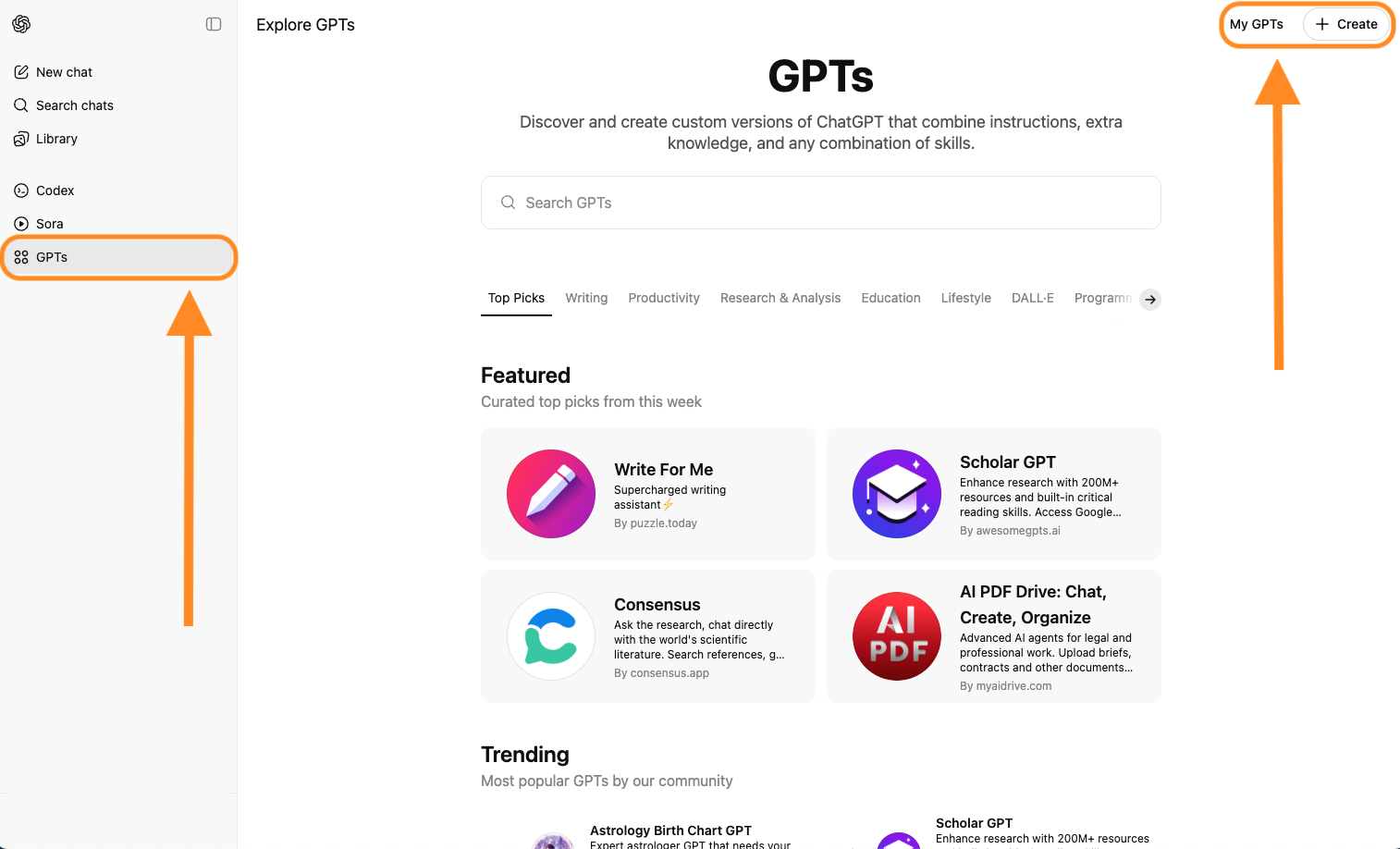
Select GPTs on the ChatGPT home page to explore and discover hundreds of GPTs you can use immediately. Use the +Create button to build and customize your own.
Note: Creating GPTs requires a paid ChatGPT subscription. The lowest paid tier is their $20/month Pro plan, which can be cancelled at any time.
Simply describe what you want in plain English. Use the Configure tab for manual setup. No coding required!
Writing the Instructions can be tricky the first few times you create a GPT. Pro Tip: return to the main ChatGPT screen, describe what you want your GPT to do, and ask ChatGPT to write the instructions! Screenshots of this GPT’s instructions are below.
The conversation starter you enter will be converted into a preset prompt button that users click to run the GPT.
Upload info, data, and details into the GPT’s Knowledge bank that it will need (and cannot find on its own) to complete the task you’ve described in the Instructions.
An expanded view of this GPT’s Instructions.


Performance and Results
After saving my new GPT and clicking the preset prompt (the Conversation Starter) to run it, the results were both impressive and confusing.
I promise that you’ll have the same experience.
Not to worry, you’ve done the heavy lifting. Refining the GPT’s output is where you start to see the finish line.
The next slide shows the initial response this custom GPT returned and how I fixed it.
The GPT only generated two stories. I asked for 10 in the instructions.
This is one of the stories.
My initial reaction to the content was good.
After reviewing this story a few more times, I can see that I will probably need to refine the persona descriptions I uploaded to the Knowledge base for this GPT. It can only work with what I give it.
Still, for the first run, it's pretty good.
But why did it only generate two stories when I asked for 10?
In my experience of helping people create custom GPTs, this is the moment where the user will assume the AI failed and bail or start collaborating with it. I wanted to understand why it didn’t deliver what (I thought) I had clearly asked for.
I followed best practice by asking the AI why it did so in the ensuing chat interaction.
On the second try, the GPT delivered 10 stories aligned with the ‘Morning Ding Dong vibe,’ but this time they were formatted differently.
To be honest, I prefer this formatting to what the GPT generated on the first try. Just personal preference. It’s tighter. But I still want three editorial comments/reactions for each host.
To fix this, I copied the top part of one of these responses, and the three editorial comments from one of the prior responses, and pasted them into a doc labeled ‘example of output format’ and uploaded it to this GPT as a Knowledge doc.
The Next Steps
Conclusion


Although everything in the GPT Instructions will be saved, output memory is not currently supported in custom GPTs. That means it won't retain context from the chat where I ask questions about its response. Editing and adjusting the Instructions based on what I learned in the chat is the only way to fine-tune its output.
I've learned that the best way to approach this process is to screenshot or copy the GPT's configuration screen, and the results it generated on the first and second try, and then use them in a conversation with ChatGPT to find out what I should adjust in the GPT’s configuration, Instructions, Knowledge files, etc. I've found that to be a productive shortcut when trying to get a GPT to live up to my expectations.
If you're still reading this and have made it this far into this explanation, you most likely fall into one of two camps: “OK, I think I get this and I'm gonna try to build my own GPT,” or, “You gotta be kidding me! I don't have time for this. Why doesn't it just work on the first try?”
I think of it this way. You wouldn't give up on a new employee who didn't nail the assignment on their first try. It would be nice if they did, but most don't.
That's how AI works. Humans built it, and human instruction and teaching are what make AI deliver on our expectations. That's exactly why I started an AI consultancy for radio people. It's worth it to me to spend a few more hours or even a day to make this GPT, or any other custom tool we create, nail the job to be done nearly 100% of the time.
Reach out if you’d like some help learning to customize a GPT, and we’ll build one together.
If you like the concept, but just don't have the time to create one of your own, that's an even better reason to get in touch. I'd love to know what you're looking for so I can build you an example of what's possible.
And it's on me, the first one’s free of charge.
OK, maybe the first two.